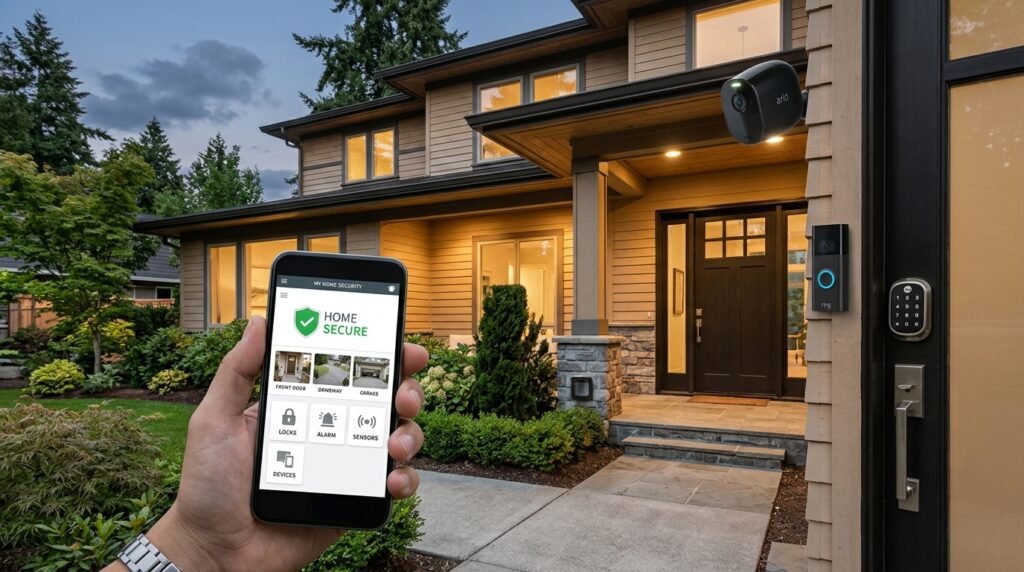
Your home security setup does not have to be complicated or expensive. The right smart home security gadgets can help you monitor entrances, receive alerts when motion is detected, check who is at your door, and keep an eye on potential problems while you are away.
From video doorbells and outdoor cameras to smart locks, alarm systems, and water-leak sensors, today’s connected devices offer different ways to make a home more convenient and easier to monitor. However, not every gadget is necessary for every household. The best setup depends on your property, budget, privacy preferences, internet connection, and the risks you want to address.
In this guide, we compare 15 smart home security gadgets worth considering in 2026, explain the features that matter, and show you how to choose compatible devices without overspending.
Quick answer: Start with a video doorbell or security camera if you mainly want to monitor entrances. Add door and window sensors or a smart alarm if you need intrusion alerts. Consider a smart lock for controlled entry and water-leak sensors for protection against certain household emergencies.
Affiliate Disclosure
SmartAirHQ may earn a commission when you purchase products through qualifying Amazon links in this article, at no additional cost to you. Affiliate relationships do not determine whether a product is suitable for your needs. Always verify current specifications, compatibility, prices, and subscription requirements before buying.
What Are Smart Home Security Gadgets?
Smart home security gadgets are connected or electronic devices that help homeowners monitor their property, control access, detect certain hazards, or receive alerts about unusual activity. Depending on the device, they may communicate through Wi-Fi, Bluetooth, a dedicated hub, or another wireless protocol.
Common examples include security cameras, video doorbells, smart locks, motion sensors, door and window sensors, alarm systems, and water-leak detectors. Some products operate independently, while others work together through a shared app or smart home platform.
A connected device can make monitoring more convenient, but it does not automatically make a property secure. Devices need appropriate installation, reliable power, secure account settings, and regular maintenance.
If you’re exploring other connected technologies for your home, our Smart Kitchen Gadgets Buying Guide covers useful devices designed to simplify everyday tasks.
Main Types of Smart Home Security Devices
Smart security device types at a glance
| Device Type | Primary Purpose | Best For |
|---|---|---|
| Indoor security camera | Monitor selected indoor areas | Checking rooms or entry points |
| Outdoor security camera | Observe outdoor areas | Driveways, yards, and entrances |
| Video doorbell | View visitors and receive door alerts | Front doors and porches |
| Smart lock | Manage and monitor door access | Keyless entry and access control |
| Door/window sensor | Detect opening or closing | Entry-point monitoring |
| Motion sensor | Detect movement in a monitored area | Rooms, hallways, and covered areas |
| Smart alarm system | Trigger alerts or a siren | Coordinated intrusion detection |
| Water-leak sensor | Detect water in a monitored location | Under sinks, near appliances, and basements |
The most useful starting point is the device that addresses your biggest concern. For some homes, that is a doorbell camera; for others, it may be a reliable alarm system or a few carefully positioned sensors.
How to Choose the Best Smart Home Security Gadgets
Before comparing products, consider how you live, what you need to monitor, and which features you will realistically use.
A renter may prefer a battery-powered doorbell and wireless sensors that are easy to remove. A homeowner with a driveway may benefit more from outdoor cameras and motion-activated lighting. Someone concerned about unauthorized entry may prioritize door sensors, a smart lock, and an alarm.
Smart security buying checklist
| Buying Factor | What to Check | Why It Matters |
|---|---|---|
| Main purpose | Entry monitoring, access control, or hazard detection | Prevents unnecessary purchases |
| Installation | Wired, battery-powered, or hub-based | Determines setup complexity |
| Connectivity | Wi-Fi, Bluetooth, or dedicated hub | Affects range and reliability |
| Phone compatibility | Supported operating systems and app | Ensures you can control the device |
| Video quality | Resolution, field of view, and night vision | Affects how useful recorded footage is |
| Storage | Local, cloud, or both | Determines recording access and ongoing costs |
| Subscription | Which features require payment | Helps calculate the real cost |
| Privacy | Encryption information, account security, and privacy controls | Helps you make an informed choice |
| Weather resistance | Suitability for the intended outdoor location | Reduces the risk of premature failure |
| Support period | Manufacturer’s stated software support | Helps assess long-term usability |
Check Compatibility Before You Buy
Devices that look similar may use different apps, hubs, wireless protocols, or subscription plans. Confirm that your chosen products work with your existing setup before ordering.
For example, if you already use a smart speaker or display, check whether a camera or doorbell supports your particular device and region. Do not assume that all products from the same brand offer identical integrations.
You can also explore our Smart Wearable Gadgets Buying Guide if you want to compare connected devices designed for personal activity tracking and everyday notifications.
15 Best Smart Home Security Gadgets to Consider in 2026
The products below represent different security categories rather than a claim that every model has been independently tested by SmartAirHQ. They are starting points for comparing features, compatibility, and current Amazon listings.
Availability, model generations, and included accessories can vary by seller and region. Check the exact listing before purchasing.
1. Ring Battery Doorbell Plus — Best for Front-Door Monitoring
A video doorbell can help you see visitors, receive alerts, and review activity around your front entrance. The Ring Battery Doorbell Plus is an option to investigate if you want a battery-powered doorbell and compatible app-based monitoring.
Before buying, check installation requirements, Wi-Fi coverage, video-storage options, and whether the features you want require a subscription.
🛍️ Shop Ring Battery Doorbell Plus on Amazon.
2. Google Nest Doorbell — Best for Google Home Users
A smart doorbell may be a practical addition if you already use compatible Google Home devices. The Nest Doorbell range offers connected visitor monitoring, with capabilities depending on the specific generation and configuration.
Check whether the listing is wired or battery-powered, which Google Home features it supports, and what recording history is available with or without a subscription.
🔎 Find Google Nest Doorbell on Amazon.
3. TP-Link Tapo C120 — Best for Flexible Indoor Monitoring
An indoor camera can help you check a room, doorway, or other selected area while away from home. The TP-Link Tapo C120 is worth comparing if you want a compact connected camera with features such as motion detection and app-based monitoring.
Review the current model specifications, privacy controls, local storage support, and any limitations associated with cloud services.
⭐ Explore TP-Link Tapo C120 on Amazon.
4. eufy Security eufyCam S330 — Best for Outdoor Camera Systems
Outdoor camera systems can help monitor yards, entrances, and driveways. The eufyCam S330 is a product to compare if you’re considering a multi-camera setup and want to investigate its available recording and power options.
Check the exact package contents, required hub, storage capacity, network requirements, and suitability for the installation location.
🏠 Find eufy Security eufyCam S330 on Amazon.
5. Arlo Pro 5S 2K — Best for Detailed Outdoor Monitoring
The Arlo Pro 5S 2K is worth considering if you want an outdoor camera with a higher-resolution video option. Actual usefulness depends on lighting, camera placement, network quality, and the details you need to identify.
Before purchasing, compare cloud plans, local recording availability, included accessories, and whether the selected configuration meets your needs.
🛒 Check Arlo Pro 5S 2K on Amazon.
6. Blink Outdoor 4 — Best for Simple Outdoor Monitoring
A battery-powered outdoor camera may suit people who want to monitor a selected area without running power cables to the installation point. Blink Outdoor 4 is an option to compare for basic outdoor monitoring.
Look closely at recording options, the accessories included in the package, motion detection settings, and any fees associated with storing or reviewing footage.
✨ Explore Blink Outdoor 4 on Amazon.
7. Reolink Argus 4 Pro — Best for Wider Outdoor Coverage
When monitoring a driveway, garden, or broad outdoor area, camera coverage is an important consideration. The Reolink Argus 4 Pro is worth investigating if you want to compare wide-area camera options.
Confirm the actual field of view, power arrangement, network requirements, recording features, and mounting options for the version you select.
🔗 See Reolink Argus 4 Pro on Amazon.
8. Ring Alarm Security System — Best for Coordinated Entry Alerts
A security system can bring multiple sensors and a central alarm into one coordinated setup. The Ring Alarm range offers a starting point for people who want to monitor doors and windows and manage alerts from a central app.
Choose a kit with suitable sensor coverage for your property. Confirm whether professional monitoring is available in your area, whether it costs extra, and what happens if the internet or power goes down.
🛍️ Shop Ring Alarm Security System on Amazon.
9. SimpliSafe Home Security System — Best for a Dedicated Alarm Setup
A dedicated home alarm system may be useful if you want coordinated entry sensors, a keypad, and an alarm rather than relying entirely on individual cameras.
Compare the current SimpliSafe package contents, installation requirements, monitoring options, cancellation terms, and regional availability before deciding whether it fits your home.
🔎 Find SimpliSafe Home Security System on Amazon.
10. Aqara Smart Lock U100 — Best for Compatible Smart-Home Entry
A smart lock can provide alternative ways to unlock a door and manage access, depending on the model and its supported ecosystem. The Aqara Smart Lock U100 is worth comparing if its supported features fit your existing setup.
Check door compatibility, installation measurements, supported access methods, backup entry options, and any hub requirements. Never assume every advertised feature is available on every phone or in every region.
⭐ Explore Aqara Smart Lock U100 on Amazon.
11. Schlage Encode Plus — Best for Connected Deadbolt Features
A connected deadbolt can make it easier to manage access without handing out physical keys for every situation. Schlage Encode Plus is an option to investigate if you want to compare smart-lock features and supported integrations.
Check door dimensions, connectivity, compatible smartphones, battery requirements, and the available backup method before installation.
🏠 Find Schlage Encode Plus on Amazon.
12. Yale Assure Lock 2 — Best for Comparing Smart-Lock Configurations
Smart locks come in different configurations, and not every version offers the same connectivity or access methods. The Yale Assure Lock 2 family is worth exploring if you want to compare keypads, app control, and supported smart-home integrations.
Select the exact model that fits your door and preferred ecosystem. Check whether a separate module or hub is required for particular features.
🛒 Check Yale Assure Lock 2 on Amazon
13. Aqara Door and Window Sensor — Best for Entry-Point Monitoring
Door and window sensors detect changes in the state of a monitored opening. They can be useful for entrances that do not need a camera, or as part of a broader alarm setup.
The Aqara Door and Window Sensor range is worth comparing if you already use, or plan to use, compatible Aqara equipment. Check the exact sensor version, required hub, battery type, and integration support.
✨ Explore Aqara Door and Window Sensor on Amazon.
14. YoLink Water Leak Sensor — Best for Water-Related Alerts
Not every home security concern involves an intruder. A water-leak sensor can alert you to water detected near an appliance, pipe, sink, or other monitored location, potentially helping you respond before a small leak becomes a larger problem.
YoLink offers water-leak sensors worth comparing for locations where its network and hub arrangements are suitable. Confirm compatibility, alert options, sensor placement guidance, and whether a hub is needed.
🔗 See YoLink Water Leak Sensor on Amazon.
15. Kidde Smart Smoke and Carbon Monoxide Alarm — Best for Connected Life-Safety Alerts
Smoke and carbon monoxide alarms serve a different purpose from intrusion cameras and locks: they warn about potentially dangerous conditions. A connected model may provide additional notifications, depending on the exact product.
Investigate the Kidde smart alarm range and verify the precise model, local code requirements, certification, installation instructions, and compatibility. Do not replace required life-safety alarms with a product that does not meet applicable requirements.
🛍️ Shop Kidde Smart Smoke and Carbon Monoxide Alarms on Amazon.
Which Security Camera Features Matter Most?
A camera’s advertised resolution is only one part of its usefulness. Placement, lighting, field of view, recording access, and the ability to identify relevant activity can matter just as much.
Security camera features compared
| Feature | What It Does | What to Consider |
|---|---|---|
| Video resolution | Determines the number of image pixels | Higher resolution needs suitable storage and bandwidth |
| Night vision | Helps capture activity in low light | Check night-time image quality and range |
| Motion detection | Identifies movement in a monitored area | Sensitivity and placement affect alerts |
| Person detection | Attempts to distinguish people from other movement | Accuracy varies by model and conditions |
| Two-way audio | Allows communication through the camera | Useful at some entrances; not essential for every setup |
| Field of view | Determines how much of an area is visible | Wide coverage can introduce distortion or reduce detail |
| Weather resistance | Supports use in specified outdoor conditions | Check the manufacturer’s installation limits |
| Local storage | Stores footage on supported local media or a hub | Check capacity, access, and theft or damage risks |
| Cloud recording | Stores footage on a service provider’s system | Check subscription costs, retention, and privacy terms |
Indoor vs. Outdoor Cameras
Indoor cameras are generally intended for protected spaces and may suit monitoring a particular room or entry area. Outdoor cameras are designed for specified environmental conditions, but the level of weather protection differs between models.
For outdoor placement, consider whether the camera covers your own property appropriately, whether lighting is adequate, and whether the mounting position exposes it to rain or extreme temperatures beyond its rating.
For indoor cameras, think carefully about privacy. Avoid placing them where household members or visitors reasonably expect privacy, and use available privacy shutters or recording schedules when appropriate.
Where Should You Install a Security Camera?
Start with the areas that matter most to you, such as a main entrance, garage access point, driveway, or side gate. Position cameras to capture useful information rather than simply increasing the number of devices.
Avoid relying on a single camera to cover every possible approach. Walls, furniture, landscaping, reflections, and poor lighting can create blind spots. Test the view at different times of day after installation.
Local Storage vs. Cloud Storage
Storage determines how footage is retained and how you can review it later. Some devices support local recording, some rely on cloud services, and others offer a combination.
Security camera storage options
| Storage Type | Main Benefit | Potential Drawback | Best For |
|---|---|---|---|
| microSD card | May avoid recurring cloud fees | Card can fail or be damaged or removed | Compatible standalone cameras |
| Home hub or recorder | Centralized storage for supported devices | Higher initial cost and setup | Multi-camera households |
| Cloud subscription | Remote access to stored recordings | Recurring fees and service dependence | Users who value off-site storage |
| Live viewing only | May avoid recording costs | Past activity may not be available | Basic monitoring needs |
| Hybrid storage | Can combine local and cloud options | More settings and possible added costs | Users wanting flexibility |
Before purchasing, check exactly which storage method is supported. A product’s ability to show a live feed does not necessarily mean it can record events without a subscription.
Also review how long recordings are retained, who can access them, whether video is encrypted, and how to delete saved footage. If the camera is intended to provide evidence after an incident, consider whether its recording arrangements meet that requirement.
Smart Locks, Sensors, and Alarm Systems: What’s the Difference?
Smart locks, entry sensors, and alarm systems perform different functions. A smart lock controls access; a sensor detects a change or event; and an alarm system can coordinate alerts and a siren using supported devices.
Choosing the Right Smart Lock
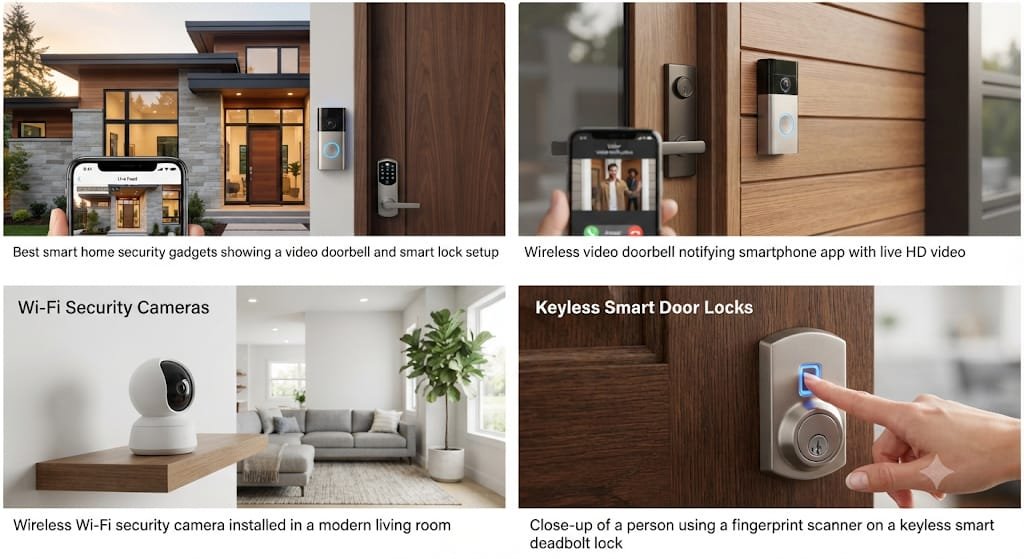
Smart locks may use keypads, physical keys, smartphone apps, fingerprints, or other supported access methods. The exact options depend on the model.
Smart-lock options compared
| Lock Type | Main Advantage | Key Consideration |
|---|---|---|
| Keypad lock | Access using a code | Manage codes carefully |
| App-controlled lock | Remote or app-based control when supported | Connectivity and account security |
| Keyed smart lock | Retains a physical key option | Key management and lock compatibility |
| Biometric lock | May support fingerprint access | Sensor performance and backup access |
| Retrofit smart lock | May use an existing deadbolt | Confirm compatibility with the current lock |
| Integrated smart deadbolt | Combines locking hardware and connected features | Door preparation and installation requirements |
A smart lock should never be selected solely because it has the most unlocking options. Confirm the lock fits the door, check its backup entry method, and understand what happens if the battery runs low or connectivity fails.
When Do You Need Sensors or an Alarm?
Door and window sensors are useful for monitoring selected entry points. Motion sensors can cover interior areas, while an alarm system may coordinate several sensors into a single setup.
For a small apartment, a door sensor and a suitable camera might be enough for your monitoring goals. A larger property may benefit from a more coordinated system, especially if there are several entrances and outbuildings.
If you have a connected household with pets, consider how motion detection will work around them. You may also find useful ideas in our guide to Pet Tech Gadgets for Smarter Pet Care, which explores technology designed for everyday pet care. Keep in mind that pet gadgets are not substitutes for a dedicated security system.
How Much Should You Budget for Smart Home Security?
The price of an individual device is only part of the total cost. Accessories, storage, subscriptions, professional monitoring, installation, and replacement batteries can affect what you spend over time.
Smart security budget planning
| Budget Approach | Possible Starting Point | What to Prioritize |
|---|---|---|
| Basic | One doorbell or camera | Reliable alerts and suitable placement |
| Entry-point focused | Door sensors plus a camera | Coverage of important entrances |
| Multi-device | Cameras, sensors, and a compatible hub | Integration and central management |
| Whole-home setup | Multiple devices and an alarm system | Coverage planning and dependable operation |
| Subscription-free preference | Devices with suitable local features | Verify exactly what works without a paid plan |
| Professionally monitored | Compatible alarm system and service | Coverage availability, contract terms, and recurring fees |
These are planning categories, not fixed price brackets. Current product prices and service charges vary, so compare the actual cost of the configuration you need.
Calculate the Total Cost of Ownership
Before buying, ask yourself:
- Does the device require a separate hub?
- Will I need additional sensors or mounting accessories?
- Does video recording require a monthly or annual subscription?
- Is professional monitoring available in my location?
- How often will batteries or other consumables need replacement?
- Can I add more devices later without replacing the whole setup?
A low-cost camera can become more expensive if the recording plan you need carries a recurring fee. Conversely, a higher initial price may be worthwhile if a device provides the storage and functions you actually need.
Smart Home Security and Privacy: Protect Your Connected Devices
A connected camera, lock, or sensor is part of your digital home as well as your physical one. If an account is poorly protected or a device no longer receives security updates, its convenience can come with avoidable risks.
The U.S. Cybersecurity and Infrastructure Security Agency (CISA) recommends practical steps such as using strong passwords, enabling multifactor authentication where available, and installing software updates. Read its Secure Our World guidance for broader account and device security advice.
The Australian Government has also introduced smart-device security standards that commenced on March 4, 2026, for covered consumer devices supplied in Australia. The scope and legal requirements depend on the rules and the specific product. See the official smart-device security standards guidance.
Smart home security maintenance checklist
| Action | What to Do | Suggested Routine |
|---|---|---|
| Secure accounts | Use unique passwords and enable multifactor authentication where supported | At setup and when reviewing account security |
| Update devices | Install firmware and app updates | Enable automatic updates where suitable |
| Review permissions | Check which users can view cameras or control locks | Periodically and after household changes |
| Test alerts | Confirm sensors, notifications, and alarms work as expected | Regularly, following manufacturer instructions |
| Check batteries | Replace or recharge batteries as recommended | According to device alerts and instructions |
| Review recordings | Check retention settings and delete footage you no longer need | Periodically |
| Check support | Confirm the manufacturer still provides security updates | Before purchase and during ownership |
| Secure Wi-Fi | Use strong router credentials and appropriate network security | At setup and after router changes |
Protect Camera and Doorbell Privacy
Before installing a camera, check its field of view and avoid recording areas where neighbors or passersby reasonably expect privacy. Local laws may govern audio recording, video surveillance, and the use of recorded footage, so check the rules that apply where you live.
Use separate accounts for household members where possible, review shared access, and remove permissions when someone no longer needs them. If a device supports privacy zones or recording schedules, configure them to match your needs.
Keep Smart Locks and Alarms Reliable
Do not rely exclusively on remote access. Understand the manufacturer’s backup-entry procedure, low-battery warnings, and behavior during a power or internet outage. Test your system according to its instructions and keep any required physical keys accessible in a safe place.
Smoke alarms and carbon monoxide alarms deserve particular care. Choose approved devices appropriate for your location, follow installation instructions, and never disable required life-safety alarms because another connected device appears to provide similar notifications.
How to Build a Practical Smart Home Security Setup
The best security system is not necessarily the one with the most devices. It is the one that addresses your needs, works reliably, and is simple enough to maintain.
Step 1: Identify Your Main Concerns
Write down the locations or problems you want to monitor. These might include the front door, a driveway, a rear entrance, a water heater, or a room containing valuable equipment.
Step 2: Start With Essential Devices
Choose one or two devices that address your highest priority. For example, a video doorbell can help with visitor monitoring, while entry sensors and an alarm can help you monitor selected doors and windows.
Step 3: Check Compatibility
Confirm that devices work with your phone, network, smart home platform, and any hub you already own. Do this before purchasing multiple products.
Step 4: Set Up Accounts and Alerts
Use secure passwords, enable available account protections, install updates, and set notifications that are useful without becoming overwhelming.
Step 5: Test the Whole Setup
Check camera views during day and night, test sensor alerts, and learn how to operate the alarm or smart lock if the internet is unavailable.
Step 6: Expand Only When Needed
Once your initial devices work reliably, add coverage where you have identified a genuine gap. A few well-placed devices are often more practical than a large collection of products with overlapping functions.
If you are improving several parts of your home at once, our guide to EV Home Charging Station Installation covers another connected-home project where electrical requirements, installation planning, and compatibility deserve careful attention.
Common Smart Home Security Buying Mistakes to Avoid
Even a feature-rich device can be a poor purchase if it does not fit your home. Avoid these common mistakes:
- Buying based on resolution alone: Camera placement, lighting, and recording access also matter.
- Ignoring recurring costs: Check storage and monitoring fees before committing.
- Assuming every device works together: Verify compatibility with your exact model and ecosystem.
- Overlooking privacy: Review camera placement, data-sharing settings, and user permissions.
- Forgetting backup access: Understand how locks and alarms work when power or connectivity is interrupted.
- Using too many notifications: Adjust alerts so important events are easier to notice.
- Skipping maintenance: Batteries, firmware, sensors, and alarms need attention.
- Treating smart devices as complete protection: Connected gadgets support a broader security plan; they cannot guarantee that a break-in or accident will never happen.
Frequently Asked Questions
What are the best smart home security gadgets for beginners?
A video doorbell or a suitable indoor or outdoor camera is a straightforward starting point for many households. If entry detection is the priority, consider door and window sensors. Choose based on the area you need to monitor and whether you want recorded footage, live viewing, or alarm notifications.
Are smart security cameras worth buying?
They can be useful if you want to check a property remotely, receive motion alerts, or review supported recordings. Their value depends on placement, reliability, storage costs, privacy settings, and how often you need to use the footage.
Do smart home security cameras need a subscription?
Not all cameras require a subscription for every function, but recording history, advanced detection, and cloud storage may depend on a paid plan. Check the exact model and current service terms before buying.
Can smart home security gadgets work without Wi-Fi?
Some devices can perform certain local functions without an internet connection, while others depend on Wi-Fi or a hub for alerts and remote access. A device’s behavior during an outage varies by model. Read the manufacturer’s documentation before relying on it for an important security function.
Are smart locks safe to use?
A properly installed smart lock from a reputable manufacturer can offer convenient access control, but no lock or connected device eliminates every risk. Check the lock’s physical security, supported account protections, software support, and backup-entry method.
How many security cameras does a home need?
There is no universal number. Start by identifying the areas you need to monitor and the coverage each camera can realistically provide. Avoid buying extra cameras before checking for blind spots and confirming that each device adds useful coverage.
What is the difference between a motion sensor and a door sensor?
A motion sensor detects movement within its detection area. A door or window sensor typically detects whether the monitored opening changes state. They can serve different purposes and may work together in a compatible alarm system.
How can I protect my smart security devices from hackers?
Use unique passwords, enable multifactor authentication where available, install updates, secure your Wi-Fi router, and review account permissions. Also check whether the manufacturer provides security updates and a clear support policy for the model you purchase.
Are smart security gadgets suitable for renters?
Many renters can use battery-powered cameras, removable doorbells, and wireless sensors, but installation restrictions vary. Check your rental agreement, building rules, and local requirements before drilling, replacing locks, or recording shared spaces.
Can I use smart home security gadgets while traveling?
Many connected devices offer remote monitoring through a supported app, provided the device, internet connection, account, and service are working. Test the setup before leaving and make sure someone can respond appropriately if an important alert occurs.
Final Verdict: Which Smart Home Security Gadgets Should You Buy?
The right smart home security gadgets depend on what you want to monitor and how much complexity you are willing to manage.
- For front-door monitoring: Compare video doorbells that fit your existing wiring, Wi-Fi, and recording preferences.
- For indoor and outdoor coverage: Choose cameras with suitable placement options, useful night-time performance, and acceptable storage costs.
- For entry control: Consider a compatible smart lock with a reliable backup method.
- For intrusion alerts: Look at door and window sensors and an alarm system that fits the size of your property.
- For household hazards: Consider appropriate water-leak sensors and compliant smoke and carbon monoxide alarms.
Before ordering, verify the exact model, compatibility, warranty, return policy, and total cost—including any recurring fees.
Ready to compare your options? Start with the devices that address your biggest concerns, then expand your setup only when you can identify a clear benefit.
🛒 Browse Smart Home Security Gadgets on Amazon.
For more practical buying guides, explore the Smart Gadgets category at SmartAirHQ.